Home Planner vs Coohom (2026): Features, Reviews and Which One to Choose

Home Planner vs Coohom compared: AI tools, phone and tablet apps, collaboration and what users say in reviews (October 2026).

Home Planner vs Coohom: which one helps more when you are about to renovate? You want to see the new room, try a few styles and show the plan to the people who will live in it or build it. Both tools let you draw a floor plan, furnish it from a large catalog of brand-name products and create realistic images of the result.
Coohom is a design and rendering platform for interior designers and furniture businesses, used in a browser or a desktop app. Home Planner is a home design app for phones, tablets and computers. Facts are as of October 2026.
The short answer
Choose Home Planner if you want to design your home and see it finished before you renovate: plan it on your phone, tablet or computer, see it as realistic photos and in new styles with its AI tools, and plan it together with your family or builder, even on the free plan. Choose Coohom if you design for clients on a computer and need very high-resolution renders or tools for custom kitchens and wardrobes.
Which one is right for you?
Choose Home Planner if you
- want to design your home and see it finished before you renovate — plan it in 2D, walk through it in 3D and furnish it, then let AI show it as realistic photos and a short video (paid plans) and answer your design questions;
- want to plan your renovation in the room itself — the full editor runs on your phone or tablet;
- want to try new styles on the rooms you already have — AI Redesign restyles a photo of your own room, house or yard;
- want to plan your home together with your family or builder — share one project, and everyone can view and edit it, free plan included.
Choose Coohom if you
- design interiors for clients on a computer — renders and 360° panoramas come at very high resolution;
- design custom kitchens, wardrobes and cabinets — dedicated tools add countertops, moldings and handles.
Home Planner vs Coohom at a glance
| Home Planner | Coohom | |
|---|---|---|
| Plan on a phone or tablet | ✓ iPhone, iPad, Android | phone apps last updated 2023 |
| Try styles on your room photo (AI Redesign) | ✓ indoor and outdoor | — |
| Plan together (collaboration) | ✓ every plan, free too | ✓ Elite plan |
| Help when you need it (what users say) | ✓ no complaints in sample | a frequent complaint |
✓ = available. — = not offered or not found on Coohom's pages.
What both apps do
In both tools you draw a floor plan in 2D, see it in 3D and furnish it with brand-name products. Both catalogs are large: Home Planner lists 500,000+ items and Coohom 600,000+ models. Both can also turn a floor plan image into an editable plan with AI (in Home Planner on PRO, not on macOS 13 or older).
Both make realistic AI images of your design on paid plans. Home Planner's first paid plan (PRO) has no monthly limit on AI Photo images and makes 2 short AI videos a week, about 9 a month; the higher plans are PRO+ and PRO++. Coohom's AI image generator starts on its Pro plan and works from a monthly allowance.
Where Home Planner is stronger
Plan your room on a phone or tablet while you stand in it
Home Planner has the same editor on iPhone, iPad, Android, Mac and Windows, so you can plan in the room itself, with the walls and windows in front of you. Coohom's iPhone and Android apps were last updated in June 2023, and there is no iPad app; its current editor runs in a browser and as a desktop app for Windows and Mac.
Try a new style on a photo of your real room
Upload a photo of your room and pick one of 40+ styles, such as Scandinavian, Japandi or Industrial. AI Redesign shows the same room in that style and is built to keep the walls, windows and doors in place. You can also restyle an outdoor photo of your house or yard. New accounts get a few free tries; after that you need the first paid plan (PRO), which has no monthly limit on restyles.
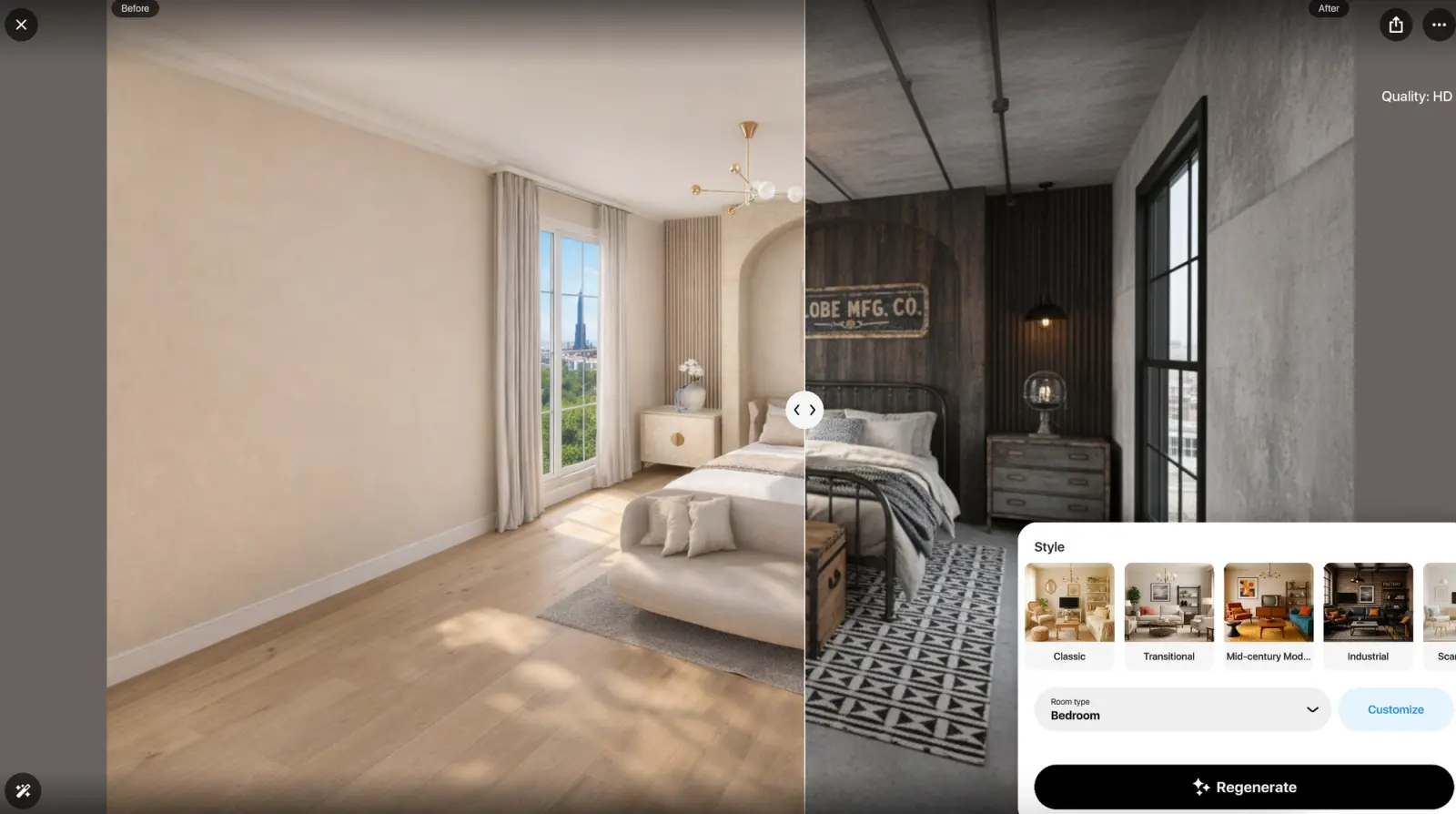
AI Redesign in Home Planner: a bedroom before (left) and in the Industrial style (right).
Plan together with your family or builder
Share a project by link or email and choose who can view it and who can edit it. Editing together is included in every Home Planner plan, the free one too, so a partner or a contractor can add their changes to the same plan. In Coohom, team collaboration comes with the Elite plan, where each member needs a paid seat.
Where Coohom is stronger
Higher-resolution renders, panoramas and video
Coohom renders images up to 8K and 360° walkthroughs up to 32K, and its paid plans make 1080p videos. Home Planner photos go up to 4K (PRO+) and 360° photos up to 8K (PRO++).
Tools for kitchens, wardrobes and cabinets
Coohom has dedicated tools for kitchens, bathrooms and closets, with countertops, moldings, handles and an AI kitchen layout. In Home Planner you furnish these rooms with catalog items or 3D models you import.
What users say
Coohom's phone apps are rated 3.0 on the US App Store (8 ratings) and 3.1 on Google Play (590 ratings). Coohom drew only 25 reviews in the past year across its phone apps and Trustpilot, so the Coohom sample covers two years. Home Planner is rated 4.6 on the US App Store (46,345 ratings), as of October 2026.
| Theme | Home Planner (80 reviews) | Coohom (50 reviews) |
|---|---|---|
| Cannot reach support, or support does not help | 0 | 10 (20%) |
| Billing problems or unexpected charges | 2 (3%) | 9 (18%) |
Home Planner: 80 written reviews from the last 12 months (50 US App Store, 30 Google Play), picked to match its overall star mix. Coohom: 50 reviews from November 2024 to October 2026 (30 on its mobile apps, 20 on Trustpilot). One review can mention several themes.
Where Home Planner's reviews look better
- Support. Support is a frequent Coohom complaint: 10 of 50 reviews say it is hard to reach or does not help, for example no live chat even on the top plan. No Home Planner review in the sample says so.
- Billing. Nine Coohom reviews report billing problems, such as a charge after cancelling, against 2 for Home Planner.
Where Coohom's reviews look better
- Renders. Three reviewers praise Coohom's renders and its computer version, even while they rate the mobile app low.
Limitations of Home Planner
- Exact sizes need a paid plan. On the free plan, walls snap to a grid; typing an exact wall or room size needs the first paid plan (PRO).
- Watermark-free images need a higher plan. Images made on the free plan and on PRO carry a watermark. Images without one, and 4K quality, start at PRO+.
- A smaller catalog. Coohom lists more models than Home Planner's 500,000+ items.
How to try Home Planner
- Install Home Planner on your phone, tablet or computer from homeplannerapp.com/get-app. You can start without paying.
- Create your room: draw the walls, or upload a floor plan image and trace the walls over it.
- Add furniture and check the room in 3D.
Home Planner does not open Coohom project files. To move a plan, download the floor plan from Coohom as an image or a PDF and upload it to Home Planner.
Trademark notice. Coohom is a trademark of COOHOM INC. or its affiliates. Home Planner is not affiliated with, endorsed or sponsored by COOHOM INC., Trustpilot A/S, Apple Inc., Google LLC or Microsoft Corporation (Windows); their names and marks belong to their owners. iPhone, iPad and Mac are trademarks of Apple Inc., registered in the U.S. and other countries. Android is a trademark of Google LLC. Other trademarks are the property of their respective owners.

Try it on your own project
Free room planner and interior design app