Home Planner vs HomeByMe (2026): Features, Reviews and Which One to Choose

Home Planner vs HomeByMe compared: AI tools, floor plan import, furniture catalog and what users say in reviews (October 2026).
Home Planner vs HomeByMe: you have a floor plan, or at least a rough sketch of your rooms, and you want to see the finished home before you order a sofa or call a builder. Both apps take you from a 2D plan to a furnished 3D view with real brand-name products, on a phone, tablet or computer.
They differ in how your floor plan gets into the app, in what AI can do with a photo of your room, and in what users report about their saved work. Facts are as of October 2026.
The short answer
Choose Home Planner if you want to design your home before you renovate: turn your floor plan into a furnished 3D home, then use its AI tools to see it as realistic photos and in new styles. It also costs less: its first paid plan, PRO, is €74.99 a year, against €299 for HomeByMe Essentials (list prices, October 2026; prices vary by country). Choose HomeByMe if you want to present a finished design as a video walk-through, or like to start from designs other people have shared.
Which one is right for you?
Choose Home Planner if you
- want to design your home and see it finished before you renovate — plan it in 2D, walk through it in 3D and furnish it, then let AI show it as realistic photos and a short video (paid plans) and answer your design questions;
- want to see your future home in 3D as soon as you have the floor plan — AI turns a picture of the plan into walls, doors and windows (PRO), with no wait for a drawing service;
- want to try new styles on the rooms you already have — AI Redesign restyles a photo of your own room, house or yard;
- want to furnish your home with pieces you can actually buy — 500,000+ items, including real brand-name products, and a search by photo.
Choose HomeByMe if you
- want to present a finished design — it renders video walk-throughs in up to 4K;
- want ideas for furnishing a room — start from community designs, or let AI furnish the room from pictures you pick.
Home Planner vs HomeByMe at a glance
| Home Planner | HomeByMe | |
|---|---|---|
| Turn a floor plan picture into 3D | ✓ by AI, in the app (PRO) | ✓ drawing service, 3 business days |
| Try styles on your room photo (AI Redesign) | ✓ indoor and outdoor | — |
| Furnish with real products (catalog) | ✓ 500,000+ items | ✓ 90,000+ products |
| Saved work stays safe (what users say) | ✓ lost projects rarely reported | a frequent complaint |
| Lower yearly price for a paid plan | ✓ €74.99 (PRO) | €299 (Essentials) |
✓ = available. — = not offered or not found on HomeByMe's pages.
What both apps do
In both apps you draw a floor plan, see it in 3D, furnish it with real brand-name products and share your project with others. Both can also scan a room with a phone camera, and both turn your design into realistic images.
Paid plans decide how many of those images you get, and in what quality. Home Planner's first paid plan, PRO, has no monthly limit on realistic AI Photo images and adds 2 short AI videos a week. These images carry a watermark; clean and 4K images come with the next plan, PRO+. HomeByMe's first paid plan, Essentials, gives 50 Full HD and 5 4K images a month, and its higher Pro plan removes the limit.
Where Home Planner is stronger
Get your floor plan into 3D without waiting
Upload a floor plan image or PDF, and Home Planner's AI builds the walls, doors and windows for you, so you can move on to furniture and colors. Check the result and fix anything it got wrong. This needs PRO and does not run on macOS 13 or older. In HomeByMe, a plan from a picture is a paid service: its team draws one floor per order, in 3 business days.
Try a new style on a photo of your real room
Upload a photo of your room and pick one of 40+ styles, such as Scandinavian, Japandi or Industrial. AI Redesign shows the same room in that style and is built to keep the walls, windows and doors in place. You can also restyle an outdoor photo of your house or yard. New accounts get a few free tries; after that you need the first paid plan (PRO), which has no monthly limit on restyles.
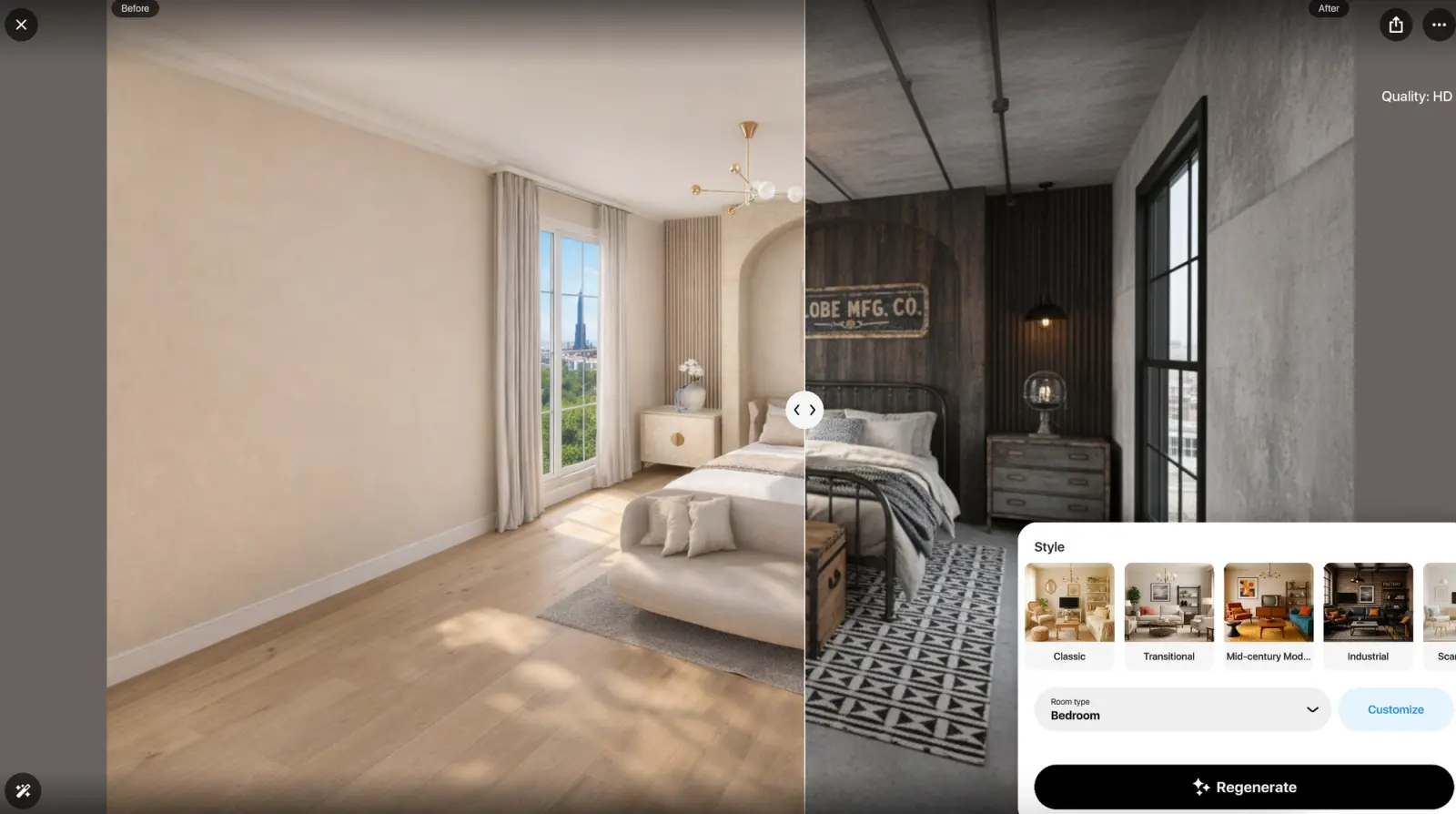
AI Redesign in Home Planner: a bedroom before (left) and in the Industrial style (right).
Furnish your room with pieces you can buy
The Home Planner catalog has 500,000+ items, including real brand-name products, so the sofa in your plan can be the sofa you order. If you like a piece you saw somewhere, upload a photo of it and the app finds a similar item. HomeByMe's catalog lists 90,000+ products from real brands.
Where HomeByMe is stronger
Video walk-throughs in up to 4K
HomeByMe Pro includes 60 seconds of Full HD and 20 seconds of 4K rendered video a month, and you can buy more if you need a longer video. It suits a finished design you want to show as one smooth walk-through.
Ideas from a large community
HomeByMe's community has created more than 16 million projects, and you can browse them for ideas. Its AutoDesign feature then uses AI to furnish your room from community images you pick, so you do not have to place every piece yourself.
What users say
Both apps are rated 4.6 on the US App Store: Home Planner from 46,345 ratings and HomeByMe from 3,011, as of October 2026.
| Theme | Home Planner | HomeByMe |
|---|---|---|
| Project lost or deleted | 5 of 308 (2%)* | 8 of 55 (15%) |
| Sign-in or connection errors | 0 of 80 | 6 of 55 (11%) |
| Praise: easy to use | 5 of 80 (6%) | 8 of 55 (15%) |
| Praise: large furniture choice | 2 of 80 (3%) | 6 of 55 (11%) |
| Free plan too limited | 15 of 80 (19%) | 4 of 55 (7%) |
Sample: 80 written Home Planner reviews from the last 12 months (50 US App Store, 30 Google Play), chosen so their star mix matches that of all its written reviews in that period; all 55 written HomeByMe reviews from the same months on the App Store in the US, Canada, the UK and Australia. *Lost projects are rare in Home Planner reviews, so this one theme was counted across all 308 of its US App Store reviews from those months. Written reviews are more negative than star ratings, and one review can raise several themes.
Where Home Planner's reviews look better
- Saved work. A lost project is a frequent HomeByMe complaint: 8 of 55 reviews say a project vanished or was deleted, against 5 of 308 for Home Planner. Six HomeByMe reviews also report sign-in or connection errors; no Home Planner review in the sample does.
Where HomeByMe's reviews look better
- Ease and choice. HomeByMe reviews praise its ease of use and its furniture choice more often.
- Free plan. Fewer HomeByMe reviews complain about the free plan: 4 of 55, against 15 of 80 for Home Planner. In 6 Home Planner reviews, the complaint is that typing exact wall sizes needs PRO.
Limitations of Home Planner
- Exact sizes need a paid plan. On the free plan, walls snap to a grid; typing an exact wall or room size needs the first paid plan (PRO).
- Watermark-free images need a higher plan. Images made on the free plan and on PRO carry a watermark. Images without one, and 4K quality, start at PRO+.
- Scans need an iPhone, iPad or Android phone. Room scan is not available on computers.
How to try Home Planner
- Install Home Planner on your phone, tablet or computer from homeplannerapp.com/get-app. You can start without paying.
- Create your room: draw the walls, or upload a floor plan image and let AI build the walls, doors and windows (PRO). On the free plan, trace the walls over the image.
- Add furniture and check the room in 3D.
Home Planner does not open HomeByMe project files. To move a plan, export a 2D plan image from HomeByMe and upload it to Home Planner.
Trademark notice. HomeByMe is a trademark or registered trademark of Dassault Systèmes or its subsidiaries. Home Planner is not affiliated with, endorsed or sponsored by Dassault Systèmes, Apple Inc., Google LLC or Microsoft Corporation (Windows); their names and marks belong to their owners. iPhone, iPad and Mac are trademarks of Apple Inc., registered in the U.S. and other countries. Android is a trademark of Google LLC. Other trademarks are the property of their respective owners.

Try it on your own project
Free room planner and interior design app