Home Planner vs Floorplanner (2026): Features, Reviews and Which One to Choose

Home Planner vs Floorplanner compared: realistic AI images, AI Redesign, furniture catalog and what users say in reviews (October 2026).
Home Planner vs Floorplanner: which one suits you depends on what you want to know before you renovate. Will the sofa fit, will the kitchen work with a new layout, and what will the room look like when it is done? Both tools let you draw your home, see it in 3D and furnish it from a large library. Floorplanner has been around since 2007.
They differ in what you get once the plan is drawn, and in how you pay. Facts are as of October 2026.
The short answer
Choose Home Planner if you want to plan your home and see the finished result before you buy furniture or renovate, with a set of AI tools turning your plan into realistic photos, video and new styles. Choose Floorplanner if you need a floor plan only from time to time and would rather not pay for a subscription.
Which one is right for you?
Choose Home Planner if you
- want to design your home and see it finished before you buy furniture — plan it in 2D, see it in 3D and furnish it, then let AI show it as realistic photos and a short video (paid plans) and answer your design questions;
- want to choose a new style for the rooms you already have — AI redesigns a photo of your own room, house or yard;
- want to furnish your home with pieces you can actually buy — 500,000+ items and materials, including real brand-name products, and a search by photo.
Choose Floorplanner if you
- need a floor plan for one move or one renovation — you buy credits for that project alone, with no subscription;
- want a plan to print or present — images go up to 8K, large enough for a poster.
Home Planner vs Floorplanner at a glance
| Home Planner | Floorplanner | |
|---|---|---|
| Realistic AI photo and video of your design | ✓ AI Photo, AI Video | — |
| Try styles on your room photo (AI Redesign) | ✓ indoor and outdoor | — |
| Furnish with real products (catalog) | ✓ 500,000+ items and materials | ✓ 260,000+ models |
✓ = available. — = not offered or not found on Floorplanner's pages.
What both apps do
In both tools you draw a floor plan, or upload a floor plan image and draw over it, then see the plan in 3D, furnish it and invite others to work on it. Both can also scan a room with a phone camera.
Both have a free plan for trying an idea. Exports on Floorplanner's free plan are small, 960 × 540 pixels, and carry a watermark; images on Home Planner's free plan carry a watermark too (watermark-free from PRO+).
Where Home Planner is stronger
See your future room as a realistic photo and a video
Once the room is furnished, AI Photo turns the 3D view into a realistic image, so you can judge colors, light and furniture before you buy anything. AI Video turns the same design into a short video with camera moves such as zoom and orbit. On the first paid plan (PRO), AI Photo has no monthly limit and you can make 2 AI videos a week; PRO+ allows 10 a week and PRO++ 30. Floorplanner shows your design as 2D and 3D images and interactive 3D tours.
Try a new style on a photo of your real room
Upload a photo of your room and pick one of 40+ styles, such as Scandinavian, Japandi or Industrial. AI Redesign shows the same room in that style and is built to keep the walls, windows and doors in place. You can also restyle an outdoor photo of your house or yard. New accounts get a few free tries; after that you need the first paid plan (PRO), which has no monthly limit on restyles.
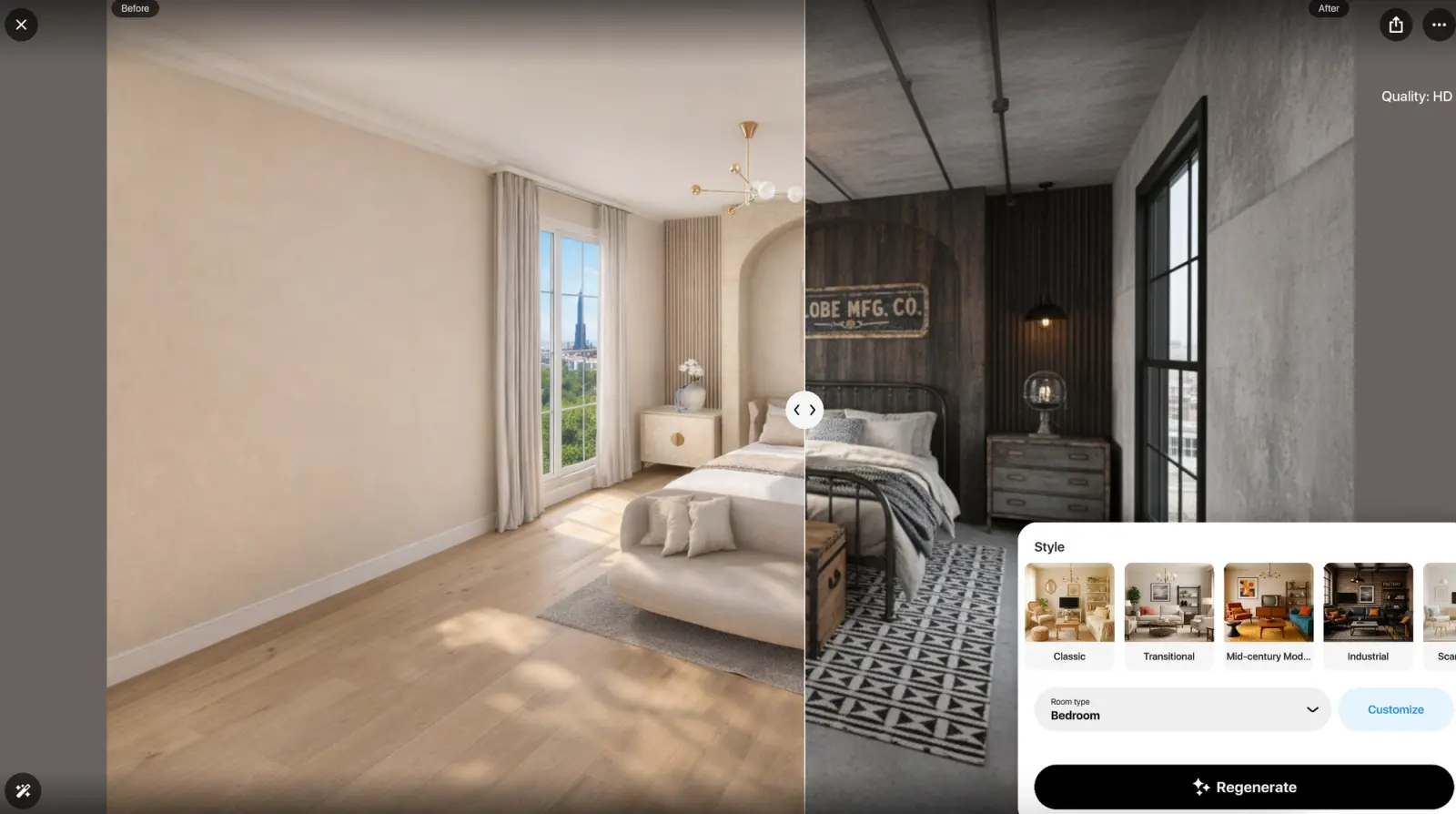
AI Redesign in Home Planner: a bedroom before (left) and in the Industrial style (right).
Furnish your room with pieces you can buy
The Home Planner catalog has 500,000+ furniture items and materials, including real brand-name products, so the sofa in your plan can be the sofa you order. If you like a piece you saw somewhere, upload a photo of it and the app finds a similar item. Floorplanner's library has 260,000+ 3D models.
Where Floorplanner is stronger
Pay per project instead of a subscription
Floorplanner sells credits that upgrade a single project to a higher image quality, so you can pay only for the plan you need, with no subscription. If you plan regularly, it also has monthly plans that include credits. Home Planner is sold by subscription.
Images up to 8K
Floorplanner exports 2D and 3D images up to 8K (7680 × 4320 pixels), large enough to print as a poster. Home Planner images go up to 4K, on PRO+.
What users say
Floorplanner has only 16 public written reviews, so read its column as examples, not rates. Home Planner drew 308 written reviews on the US App Store alone in the past year, so its 80-review sample shows how often each theme comes up.
| Theme | Home Planner (80 reviews) | Floorplanner (16 reviews) |
|---|---|---|
| Paying credits for each export or extra floor | 0 | 3 |
| Good value for the price (praise) | 0 | 3 |
| Subscription price or free plan too limited | 18 | 0 |
Sample: 80 written Home Planner reviews from the last 12 months (50 US App Store, 30 Google Play), chosen so their star mix matches that of all its written reviews in that period; 16 Floorplanner reviews on Trustpilot (April 2021 to October 2026). One review can raise several themes.
Where Home Planner's reviews look better
- No fee per export. Three of the 16 Floorplanner reviews complain about paying credits for each export or extra floor; one reviewer paid just to save a single A4 export. Home Planner has no per-export fees.
Where Floorplanner's reviews look better
- Value for money. Three Floorplanner reviewers call it good value, and one says cancelling is easy. In Home Planner reviews, the subscription price and free plan limits are a common complaint (18 of 80).
Limitations of Home Planner
- Exact sizes need a paid plan. On the free plan, walls snap to a grid; typing an exact wall or room size needs the first paid plan (PRO).
- Watermark-free images need a higher plan. Images made on the free plan and on PRO carry a watermark. Images without one, and 4K quality, start at PRO+.
- Scans need an iPhone, iPad or Android phone. Room scan is not available on computers.
- Floorplanner's entry paid plan costs less per year than Home Planner's (list prices, October 2026).
How to try Home Planner
- Install Home Planner on your phone, tablet or computer from homeplannerapp.com/get-app. You can start without paying.
- Create your room: draw the walls, or upload a floor plan image and trace the walls over it.
- Add furniture and check the room in 3D.
Home Planner does not open Floorplanner project files. To move a plan, export it from Floorplanner as an image and upload it to Home Planner as a floor plan.
Trademark notice. Floorplanner is a trademark of its owner, Floorplanner Inc. / Floorplanner.com B.V. Home Planner is not affiliated with, endorsed or sponsored by Floorplanner Inc., Floorplanner.com B.V., Trustpilot A/S, Apple Inc., Google LLC or Microsoft Corporation (Windows); their names and marks belong to their owners. iPhone, iPad and Mac are trademarks of Apple Inc., registered in the U.S. and other countries. Android is a trademark of Google LLC. Other trademarks are the property of their respective owners.

Try it on your own project
Free room planner and interior design app