Home Planner vs Planner 5D (2026): Features, Reviews and Which One to Choose

Home Planner vs Planner 5D compared: AI tools, room scan, furniture catalog and what users say in reviews (October 2026).
Home Planner vs Planner 5D: both apps let you see your new kitchen, bedroom or whole home before you spend money on it, with a floor plan, a 3D view and furniture, on a phone, tablet or computer. They differ in their AI tools, in the furniture you can actually buy, and in what users say about them.
Facts are as of October 2026. Where a feature works only on some devices, the text says so.
The short answer
Choose Home Planner if you want to design your home before you renovate: plan it, see it in 3D, furnish it with products you can buy, and use its AI tools to see it as realistic images and in new styles. Choose Planner 5D if you need more than 10 home or apartment projects on a free plan, or have no floor plan yet and want AI to draft one from a sketch or a few words.
Which one is right for you?
Choose Home Planner if you
- want to design your home and see it finished before you renovate — plan it in 2D, walk through it in 3D and furnish it, then let AI show it as realistic photos and a short video (paid plans) and answer your design questions;
- want to try new styles on the rooms you already have — AI Redesign restyles a photo of your own room, house or yard;
- want to furnish a room with pieces you can actually buy — 500,000+ items, including real brand-name products, and a search by photo;
- want furniture and materials that fit your real rooms — plan from accurate measurements, taken with your phone's LiDAR scan or a laser distance meter, and check the fit in 3D.
Choose Planner 5D if you
- want to plan more than 10 home or apartment projects on a free plan;
- want to design a home you have no floor plan for yet — AI drafts a first plan from a sketch or a few words (paid plan).
Home Planner vs Planner 5D at a glance
| Home Planner | Planner 5D | |
|---|---|---|
| Try styles on your room photo (AI Redesign) | ✓ free tries | ✓ paid plans |
| Furnish with real products (catalog) | ✓ 500,000+ items | ✓ 10,000+ items |
| No surprise charges (what users say in reviews) | ✓ rarely mentioned | a frequent complaint |
What both apps do
In both apps you draw a floor plan, see it in 3D, furnish it and share it for viewing or editing, even on the free plan. Both can also scan a room with a phone camera. On paid plans, both turn a floor plan image into an editable project (in Home Planner, not on macOS 13 or older) and make realistic AI images and video of your design.
Paid plans add AI on top. Home Planner's first paid plan (PRO) has no monthly limit on realistic AI Photo images or AI Redesign restyles, and makes 2 short AI videos a week, about 9 a month. Planner 5D's first paid plan (Premium) gives about 50 AI images a month; the same AI credits also pay for videos and for floor plans drafted from a sketch.
Where Home Planner is stronger
Try a new style on a photo of your real room
Upload a photo of your room and pick one of 40+ styles, such as Scandinavian, Japandi or Industrial. AI Redesign shows the same room in that style and is built to keep the walls, windows and doors in place. You can also restyle an outdoor photo of your house or yard. New accounts get a few free tries; after that you need the first paid plan (PRO). Unlike AI Photo, which works on your 3D design, AI Redesign works on a photo of your real room.
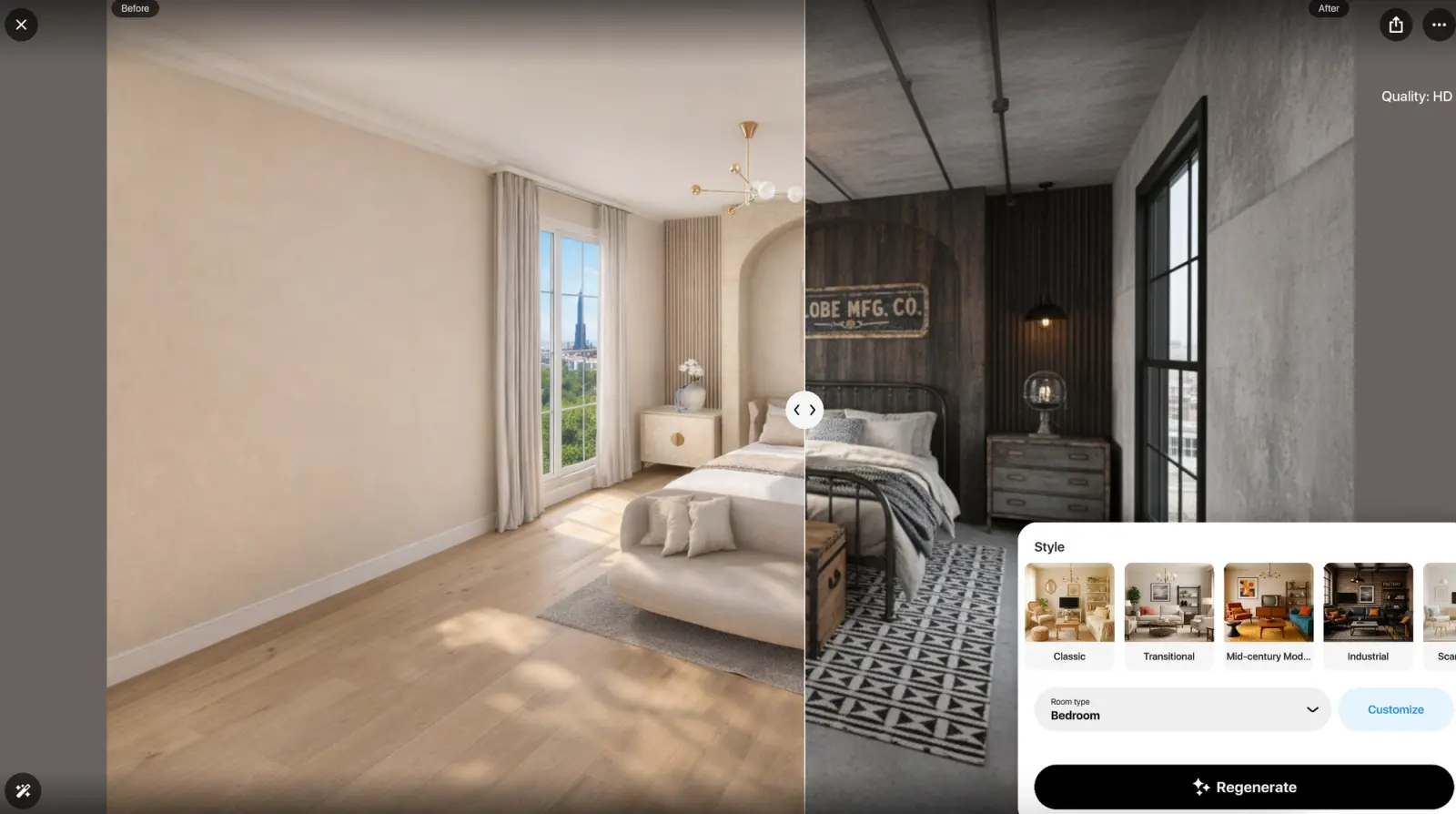
AI Redesign in Home Planner: a bedroom before (left) and in the Industrial style (right).
Furnish your room with pieces you can buy
The Home Planner catalog has 500,000+ items, including real brand-name products, so the sofa in your plan can be the sofa you order. If you like a piece you saw somewhere, upload a photo of it and the app finds a similar item. The Planner 5D catalog lists 10,000+ items.
Plan from accurate room sizes
Furniture fits only if the plan matches the room. On an iPhone or iPad Pro with LiDAR, the room scan measures the walls; you can also connect a laser meter and measure each wall with it. Home Planner works with 55+ models from 14 brands on iPhone, iPad, Android and Mac (paid plan; not on Windows).
Where Planner 5D is stronger
No project limit on the free plan
Planner 5D's free plan has no limit on the number of projects. Home Planner allows up to 10 saved projects on the free plan (projects in the trash do not count), and one project can hold a whole home. PRO raises the limit to 20; PRO+ removes it.
A first floor plan from a sketch or a few words
If you have no floor plan yet, Planner 5D's AI tool, AI Studio, can create one from a hand sketch, an image or a text description, so you do not have to draw the walls from scratch. It draws on the same monthly AI allowance as images, so it needs a paid plan. Home Planner starts from a plan you draw, scan or upload.
What users say
Store ratings are close: on the US App Store, Home Planner is rated 4.6 (46,345 ratings) and Planner 5D 4.4 (41,965 ratings), as of October 2026.
| Theme | Home Planner (80 reviews) | Planner 5D (80 reviews) |
|---|---|---|
| Billing problems or unexpected charges | 2 | 17 |
| Too many pop-ups and upgrade prompts | 1 | 8 |
| Support unreachable or unhelpful | 0 | 5 |
| Praise: fun or relaxing to use | 16 | 1 |
| Crashes and freezes | 15 | 7 |
Counts come from 80 written reviews of each app (50 from the US App Store, 30 from Google Play) from the 12 months to October 2026, sampled to match the star mix of each app's written reviews in that period. Written reviews are more negative than the overall store rating. One review can mention several themes.
Where Home Planner's reviews look better
- Billing. Billing is the most common Planner 5D complaint. 17 of 80 reviews describe billing problems, such as a charge after a trial or a cancellation, a subscription they could not cancel, or a refused refund. Home Planner gets 2 such complaints.
- Pop-ups and support. One Home Planner review mentions pop-ups or upgrade prompts, against 8 for Planner 5D. Five Planner 5D reviews say support could not be reached or did not help, against none for Home Planner.
- Enjoyment. Sixteen Home Planner reviews call the app fun or relaxing to use, against 1 for Planner 5D.
Where Planner 5D's reviews look better
- Stability. 15 of 80 Home Planner reviews mention crashes or freezes, against 7 for Planner 5D.
Limitations of Home Planner
- Exact sizes need a paid plan. On the free plan, walls snap to a grid; typing an exact wall or room size needs the first paid plan (PRO).
- Watermark-free images need a higher plan. Images made on the free plan and on PRO carry a watermark. Images without one, and 4K quality, start at PRO+.
- Scans need an iPhone, iPad or Android phone. Room scan is not available on computers.
- On each company's website, Planner 5D's basic paid plan costs less per year (October 2026).
How to try Home Planner
- Install Home Planner on your phone, tablet or computer from homeplannerapp.com/get-app. You can start without paying.
- Create your room: draw the walls, or upload a floor plan image and trace the walls over it.
- Add furniture and check the room in 3D.
Home Planner does not open Planner 5D project files. To move a project, save its floor plan as an image in Planner 5D and upload it to Home Planner.
Trademark notice. Planner 5D is a trademark of Planner5D, UAB. Home Planner is not affiliated with, endorsed or sponsored by Planner5D, UAB, Apple Inc., Google LLC or Microsoft Corporation (Windows); their names and marks belong to their owners. iPhone, iPad and Mac are trademarks of Apple Inc., registered in the U.S. and other countries. Android is a trademark of Google LLC. Other trademarks are the property of their respective owners.

Try it on your own project
Free room planner and interior design app