Home Planner vs SketchUp (2026): A Room Planner or a 3D Modeler?

Home Planner vs SketchUp: plan and furnish your home, or model any shape? AI tools, phone apps and what users say in reviews (October 2026).
Home Planner vs SketchUp: you want to see your new living room before you buy anything, and someone told you to just model it in SketchUp. Both can give you a furnished 3D room, but they are different kinds of tools. Home Planner is a home design app: you draw or upload a floor plan, place furniture from a catalog and create realistic images. SketchUp is a general 3D modeling program used by architects, designers and makers.
When this post compares mobile apps and their store reviews, it uses SketchUp for iPad, SketchUp's modeling app for mobile devices. Facts are as of October 2026.
The short answer
Choose Home Planner if you want to plan your home without learning 3D modeling and see it furnished, with the help of its AI tools, before you buy or renovate. Choose SketchUp if you want to model any shape you can imagine and are ready to learn a full 3D modeling program.
Which one is right for you?
Choose Home Planner if you
- want to design your home without learning 3D modeling — draw a 2D plan and the app builds the 3D rooms for you to furnish;
- want to see your future home before you buy or renovate — a set of AI tools turns your design into realistic photos and, on a paid plan, a video, restyles a photo of your real room and answers design questions in an AI designer chat;
- want to plan your renovation standing in the room — the full editor runs on your phone, as well as on a tablet or computer.
Choose SketchUp if you
- want to design custom pieces or a whole building — you can model any shape, from built-in furniture to stairs;
- want a specific manufacturer's product in your design — its library holds millions of 3D models from hundreds of manufacturer catalogs, well beyond Home Planner's 500,000+ items.
Home Planner vs SketchUp at a glance
| Home Planner | SketchUp | |
|---|---|---|
| Realistic AI photos of your design | ✓ no monthly limit (PRO) | ✓ up to 10 a month (Go) |
| Try styles on your room photo (AI Redesign) | ✓ indoor and outdoor | — |
| Design on a phone | ✓ full editor | — viewer only |
| Sign in without trouble (what users say) | ✓ not reported | a frequent complaint |
✓ = available. — = not offered or not found on SketchUp's pages.
What both apps do
In both you can build a 3D model of your room, furnish it from a large library and share it with others. Both can also scan a room with the camera of a mobile device, and both turn a 3D design into realistic images with AI.
Where you plan differs. SketchUp runs on Windows and Mac computers, on iPad and in a browser; on iPhone it offers a viewer. Home Planner's editor runs on iPhone, iPad, Android, Mac and Windows.
Where Home Planner is stronger
Draw a floor plan, get a furnished 3D room
In Home Planner you draw walls in 2D, or trace them over an uploaded floor plan, add doors and windows, and the app builds the rooms, floors and ceilings in 3D. The Home Planner catalog has 500,000+ items, including real brand-name products, so the sofa in your plan can be the sofa you order. If you like a piece you saw somewhere, upload a photo of it and the app finds a similar item. In SketchUp you build the room with general 3D tools and download furniture models from its 3D Warehouse library.
See your future room as a realistic photo and a video
Once the room is furnished, AI Photo turns the 3D view into a realistic image, so you can judge colors, light and furniture before you buy anything; the first paid plan (PRO) has no monthly limit on these images. Home Planner's paid plans go PRO, then PRO+, then PRO++. AI Video turns the same design into a short video with camera moves such as zoom and orbit, 2 a week on PRO. SketchUp's AI Render also makes realistic images from a model: up to 10 a month on its Go plan and none on the free plan.
Try a new style on a photo of your real room
Upload a photo of your room and pick one of 40+ styles, such as Scandinavian, Japandi or Industrial. AI Redesign shows the same room in that style and is built to keep the walls, windows and doors in place. You can also restyle an outdoor photo of your house or yard. New accounts get a few free tries; after that you need the first paid plan (PRO), which has no monthly limit on restyles.
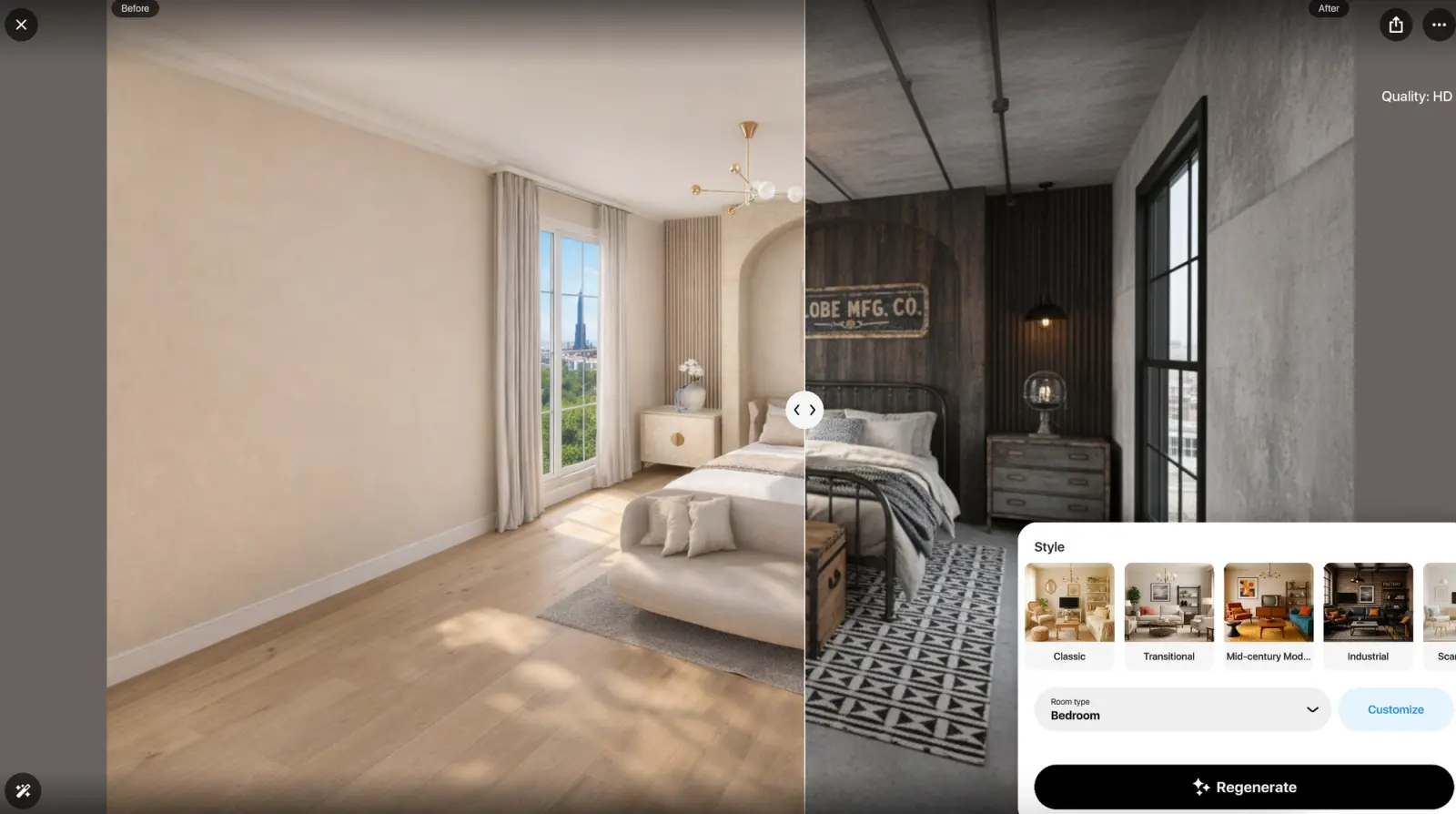
AI Redesign in Home Planner: a bedroom before (left) and in the Industrial style (right).
Where SketchUp is stronger
Model any shape
In SketchUp you can build any shape: custom cabinets, stairs, facades or a whole building. In Home Planner you combine walls, openings, catalog items and 3D models you import, SketchUp (SKP) files included.
Millions of 3D models
SketchUp's 3D Warehouse holds millions of 3D models, including hundreds of manufacturer catalogs, so a specific product often already exists as a model.
What users say
On the US App Store, Home Planner is rated 4.6 (46,345 ratings) and SketchUp for iPad 4.5 (18,006 ratings), as of October 2026. Written reviews from the past year are harsher: they average 3.2 stars for Home Planner (308 reviews, US) and 1.7 for SketchUp for iPad (110 reviews, US, UK, Canada and Australia).
| Theme | Home Planner (80 reviews) | SketchUp for iPad (50 reviews) |
|---|---|---|
| Cannot sign in, or locked out of the account | 0 | 8 (16%) |
| Cannot reach support | 0 | 3 (6%) |
| Crashes, bugs or lost work | 15 (19%) | 7 (14%) |
Home Planner: 80 written reviews from the last 12 months (50 US App Store, 30 Google Play), picked to match its overall star mix. SketchUp for iPad: the 50 newest reviews on the App Store in the US, the UK, Canada and Australia (March to October 2026). One review can mention several themes.
Where Home Planner's reviews look better
- Sign-in. Sign-in is a frequent SketchUp for iPad complaint: 8 of 50 reviewers could not sign in or were locked out of their account. Home Planner reviews do not report sign-in problems.
Where SketchUp's reviews look better
- Stability. SketchUp for iPad reviews report crashes, bugs or lost work a little less often: 14% against 19%.
- Modeling power. Three reviewers praise SketchUp's modeling power and smooth navigation on iPad.
Limitations of Home Planner
- Exact sizes need a paid plan. On the free plan, walls snap to a grid; typing an exact wall or room size needs the first paid plan (PRO).
- Watermark-free images need a higher plan. Images made on the free plan and on PRO carry a watermark. Images without one, and 4K quality, start at PRO+.
- Scans need an iPhone, iPad or Android phone. Room scan is not available on computers.
How to try Home Planner
- Install Home Planner on your phone, tablet or computer from homeplannerapp.com/get-app. You can start without paying.
- Create your room: draw the walls, or upload a floor plan image and trace the walls over it.
- Add furniture and check the room in 3D.
Home Planner imports SketchUp (SKP) models as individual objects. A whole SketchUp building does not import as an editable floor plan: export a 2D plan image from SketchUp and upload it as a floor plan instead.
Trademark notice. SketchUp is a trademark of Trimble Inc. Home Planner is not affiliated with, endorsed or sponsored by Trimble Inc., Apple Inc., Google LLC or Microsoft Corporation (Windows); their names and marks belong to their owners. iPhone, iPad and Mac are trademarks of Apple Inc., registered in the U.S. and other countries. Android is a trademark of Google LLC. Other trademarks are the property of their respective owners.

Try it on your own project
Free room planner and interior design app